
1
Question
- Who needs the answer?
- When?
- What decision changes?
Business Data Guide
Your business may already collect the information it needs, but it can be scattered across spreadsheets, forms, inboxes, reports, and different tools. Start with one question, decide which records to trust, and put the answer where someone can use it.
Data-to-decision path
A business can have plenty of data and still feel like it is operating in the dark. Customer details may live in a form, job status in a spreadsheet, payments in accounting software, and the latest decision in a text message. The goal is not to gather everything into one enormous system. The goal is to answer one useful business question with information people can understand and trust.
A useful information project begins with a question, a person who needs the answer, and a clear action—not with a dashboard or a plan to connect every tool.
Name the question, who needs the answer, when they need it, and what they would do differently. “Which active jobs have been waiting more than five days?” is more useful than “we need better reporting.”
A clear question creates a boundary. It tells the team which facts matter and prevents the project from becoming a tour of every field the business has ever collected.
Decide whether the result should assign an owner, contact a customer, correct information, reorder inventory, update a schedule, investigate an unusual change, or prepare a decision for review.
Information that produces no action may still be interesting, but it is not yet a business capability.
The answer may be spread across several systems. The work is to understand which facts come from where and what should happen when those records disagree.
List every source that contains part of the answer: forms, spreadsheets, accounting software, calendars, project boards, reports, email, or another operational tool. Do not assume the most official-looking system contains the most current information.
Write who updates each source and how quickly changes appear. A record can be authoritative in theory and still be too stale for the decision in front of the team.
When two places disagree, decide which one wins. Different facts may have different trusted homes: accounting may own payment status, the calendar may own appointment time, and the project board may own the current stage of work.
The goal is not necessarily one system. It is one agreed answer for each fact that matters.
Define the small set of terms that affect the decision: new, waiting, scheduled, complete, closed, active, qualified, overdue, or any local language the team uses.
Many apparent data problems are language problems. A report cannot produce a trustworthy answer when people use the same status to mean different things.
Data convergence
Existing sources
Different tools can remain separate while the important facts become consistent.One dependable answer
Clarify meaning
Make it usable
Choose the response
Close the loop
Not every question needs perfect data, but the amount of checking should match the cost of being wrong.
Review missing details, duplicate records, stale statuses, repeated entry, update dates, formulas, correction history, and access. Look at real examples where the answer was wrong or took too long to reconstruct.
A casual weekly planning list may tolerate more uncertainty than a payment, compliance, staffing, or customer-safety decision.
Put the answer where the work happens: a filtered spreadsheet, weekly email, project list, reminder, small dashboard, meeting report, or alert. A five-row list that someone acts on can be more valuable than a large dashboard nobody opens.
Include only the context needed to understand and use the answer. More charts do not automatically create more clarity.
A useful view needs a person responsible for its meaning, quality, access, and connection to the next step.
Name who understands the question, trusted records, shared definitions, review frequency, access rules, and correction path. That person does not need to enter every record, but they do need to notice when the answer stops being dependable.
Ownership also includes deciding when the question or definition has changed enough that the view needs to change with it.
Test the answer during real work. Watch whether people use it, whether it changes decisions, how often it requires correction, and what context is still missing.
Once one question can be answered reliably, reduce manual copying or connect stable sources carefully. Do not connect several unclear systems merely to create the appearance of one central platform.
Visual guide
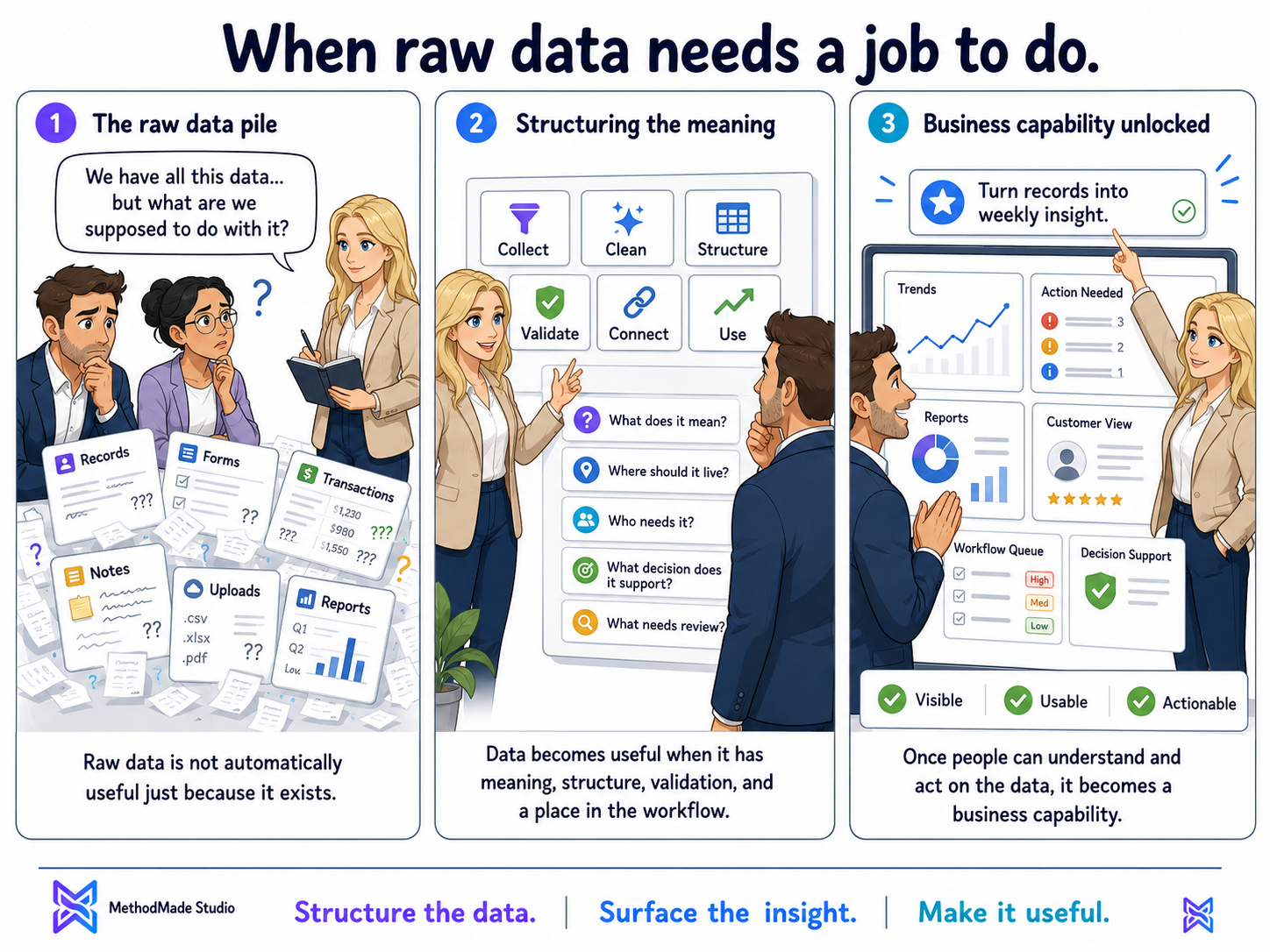
Data becomes useful when it supports a real decision.
Your action plan
A one-page data-to-decision map showing the question, sources, trusted record, important definitions, owner, useful view, and next action.
Related MethodMade support
MethodMade can trace where important information comes from, decide which records should be trusted, clarify shared definitions, and create a practical view or workflow without building a giant data platform first.
A natural next step
The guide or story below builds naturally on what you just read.